

- Tracking model performance regressions
- Coordinating shared evaluation workflows
Leaderboard creation is only available for the Weave UI and Weave Python SDK. If you use TypeScript, you can create and manage leaderboards using the Weave UI.
Create a leaderboard
You can create a leaderboard via the Weave UI or programmatically.Using the UI
To create and customize leaderboards directly in the Weave UI:- In the Weave UI, Navigate to the Leaders section. If it’s not visible, click More → Leaders.
- Click + New Leaderboard.
- In the Leaderboard Title field, enter a descriptive name (e.g.,
summarization-benchmark-v1). - Optionally, add a description to explain what this leaderboard compares.
- Add columns to define which evaluations and metrics to display.
- Once you’re happy with the layout, save and publish your leaderboard to share it with others.
Add columns
Each column in a leaderboard represents a metric from a specific evaluation. To configure a column, you specify:- Evaluation: Select an evaluation run from the dropdown (must be previously created).
- Scorer: Select a scoring function (e.g.,
jaccard_similarity,simple_accuracy) used in that evaluation. - Metric: Select a summary metric to display (e.g.,
mean,true_fraction, etc.).
⋯) on the right. You can:
- Move before / after – Reorder columns
- Duplicate – Copy the column definition
- Delete – Remove the column
- Sort ascending – Set the default sort for the leaderboard (click again to toggle descending)
Python
To create and publish a leaderboard:-
Define a test dataset. You can use the built-in
Dataset, or define a list of inputs and targets manually: -
Define one or more scorers:
-
Create an
Evaluation: -
Define models to be evaluated:
-
Run the evaluation:
-
Create the leaderboard:
-
Publish the leaderboard.
-
Retrieve the results:
End-to-End Python example
The following example uses Weave Evaluations and creates a leaderboard to compare three summarization models on a shared dataset using a custom metric. It creates a small benchmark, evaluates each model, scores each model with Jaccard similarity, and publishes the results to a Weave leaderboard.View and interpret the Leaderboard
After the script finishes running, view the leaderboard:- In the Weave UI, navigate to the Leaders tab. If it’s not visible, click More, then select Leaders.
- Click on the name of your leaderboard—e.g.
Summarization Model Comparison.
model_humanlike, model_vanilla, model_messy). The mean column shows the average Jaccard similarity between the model’s output and the reference summaries.
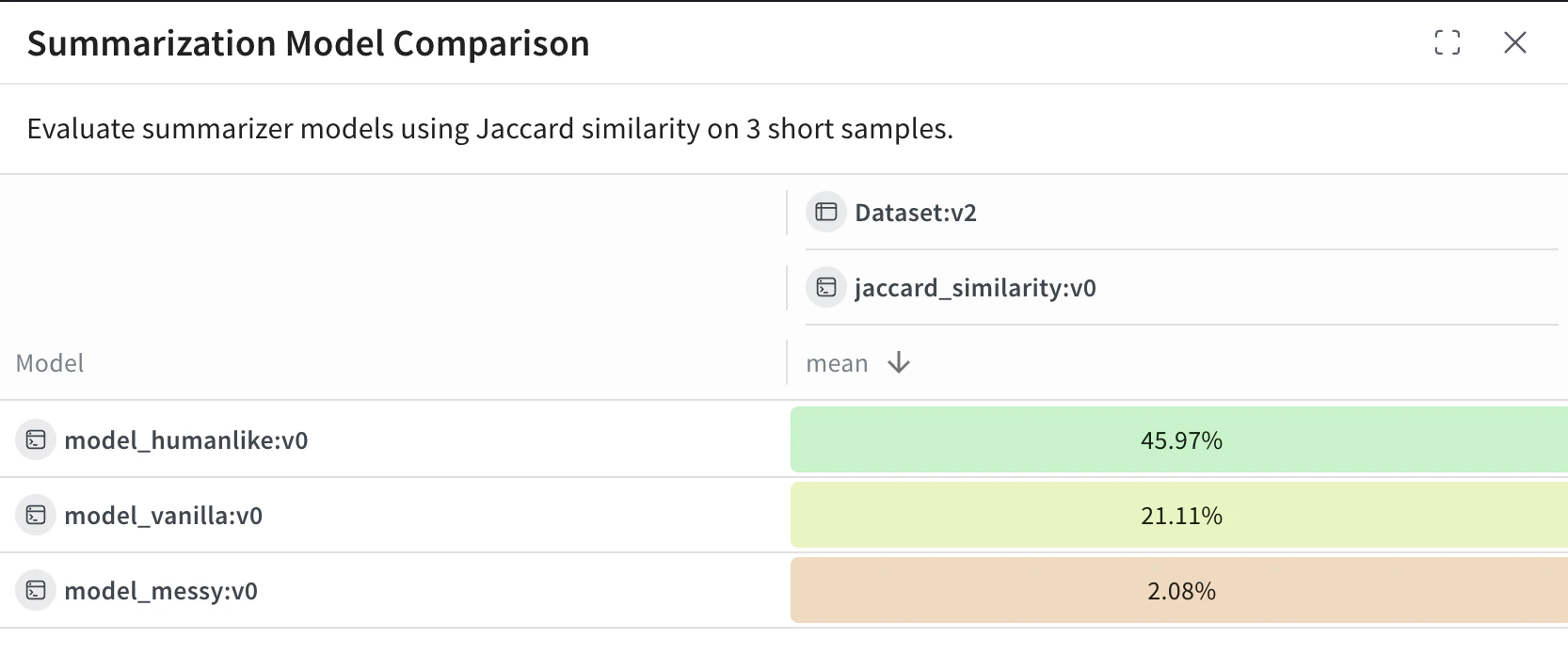
model_humanlikeperforms the best, with ~46% overlap.model_vanilla(a naive truncation) gets ~21%.model_messyan intentionally bad model, scores ~2%.